
The complete guide to choosing a label printer
Volume, ink type, label width and the real cost: the four questions that decide which label printer suits your business — with the NeuraLabel Callisto as a recurring example.
Printing labels yourself changes more in a business than most people expect. No more minimum orders at an outside printing house, no more boxes full of obsolete labels after a recipe change, no more waiting two weeks for a new run. You print what you need, at the moment you need it.
But then you do have to choose the right machine. And that is harder than laying specification sheets side by side, because the printer that is fastest on paper can be exactly the wrong choice in your situation.
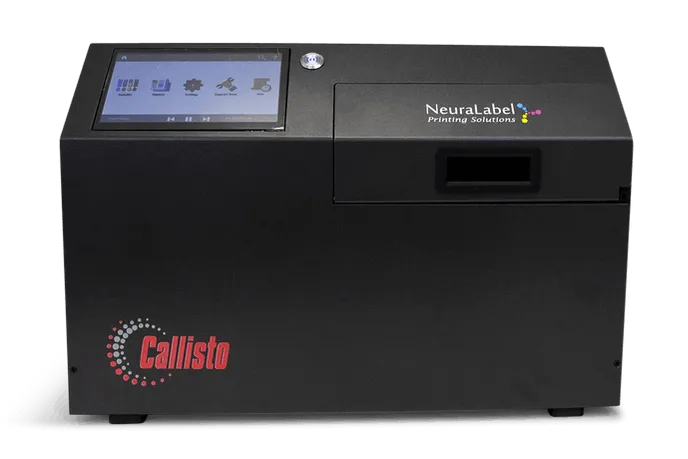
In this guide we work through the four questions that decide the choice in practice. Where it helps, we use the NeuraLabel Callisto as an example — not because that machine is always the answer, but because it illustrates the extremes of the spectrum well.
1. Start with your label, not with the printer
The temptation to start from the machine is strong. Yet every good choice starts with the label itself: what do you print, where does it end up, and how long does it have to stay legible?
Four questions bring that into focus:
- How many labels do you print per day? A production of two hundred units calls for a different machine than a line that runs all day. A machine that is too light becomes the bottleneck of your production; one that is too heavy is capital standing idle.
- How wide is your label? This is the criterion most often overlooked — and it rules models out most firmly. More on that in point three.
- Where does the label end up? A box in a dry warehouse places different demands than a drum standing outdoors for months, or packaging that goes into the freezer.
- How long does it have to last? A shipping label lives for days. A rating plate on a machine part has to still be there years later.
Anyone with these four answers on paper has already made the hardest part of the choice. The rest is a matter of matching.
2. Ink type: where most mistakes are made
With inkjet label printers there are two families of ink, and the difference between them often decides whether your label is still legible after six months.
Dye ink
Dye ink consists of colourant that soaks into the coating of the label. The result: deep, vivid colours and sharp detail, at a lower cost per label. For product labels that have to stand out on a shop shelf, or for shipping labels that have done their job after a week, that is exactly what you need.
The limitation lies in durability. Dye ink fades under UV light and dissolves on prolonged contact with moisture. Some machines therefore offer a moisture-resistant variant — at Afinia Label it is called WaterShield — which is clearly better at coping with condensation and refrigeration, but is not a genuine outdoor solution.
Pigment ink
Pigment ink works differently: the colour sits in solid particles that stay on the surface. That makes the print water- and smudge-proof, UV-resistant and resistant to chemicals such as alcohol and acetone. Pigment ink is slightly more expensive and slightly slower, but it is the only type of ink that lasts for years outdoors.
The NeuraLabel Callisto prints exclusively with water-based pigment ink, and so meets the BS5609 standard: labels that survive ninety days of immersion in seawater, UV exposure and abrasion tests. For anyone labelling hazardous substances, that is not a luxury but a legal bar.
The practical rule of thumb: first decide how long your label has to last, and let that determine the ink type. Not the other way round.
3. Label width: the criterion that rules models out
Volume and ink get the most attention, but in practice the width of your label is the detail that selects most firmly. A machine that prints up to 216 millimetres does not print up to 217 — there is no setting or compromise for that.
For most product and shipping labels those 216 millimetres are more than enough. But as soon as you move towards A4 or A3, the field gets small. GHS labels for hazardous substances usually start at A5 format and run up to A3, and then one machine is left in our range: the Callisto prints labels from under 25 millimetres up to 296 millimetres wide on the same machine.
So measure your widest label before you start comparing. It saves you a lot of options that are not in the running anyway.
4. What it really costs
The purchase price is the amount you pay once. The ink and the labels you pay for again every month — and that is usually the amount that makes the difference after two years.
So work out three things together:
- Consumables. The cost per label depends on the ink type, the colour coverage and the cartridge size. A machine with large, separate cartridges is more expensive to buy but often considerably cheaper per label.
- Maintenance. A yearly service costs money, but extends the life of your printhead and prevents downtime at the moment it suits you least.
- What you no longer spend. Do not forget to subtract what you pay today for outside printing, minimum orders and discarded stock.
We are happy to work that out with you beforehand, on the basis of your own volume and your own label. That way you know what the machine costs you per year — and not only what it costs today.
5. Standards: when the choice is made for you
If you label hazardous substances, the regulations decide part of your choice. A GHS label has to stay legible under conditions where an ordinary product label would long since have let go, and BS5609 is in practice the standard it is measured against.
That calls for three things at once: pigment ink, certified label material, and a machine that reaches the required width. The Callisto combines those three, and that is exactly why it so often becomes the recommendation in the chemicals industry.
If you do not work with hazardous substances, this criterion falls away — and lighter, cheaper machines come fully into the picture again.
Conclusion: asking the right question is half the work
Choosing a label printer is not a matter of finding the best machine, but of finding the machine that suits your label. Volume, ink type, width and the real cost together decide which models are left. Often that is only one or two after that round.
Not sure where you end up? Then work through our selection guide: five short questions about your label and your production, and you will know which model suits you — with the reason alongside. Prefer someone to think it through with you straight away? Send us your situation and you get advice with no obligation, including a concrete quote.