
Callisto, L901, L801 or L502: our four printers compared
What really sets the four models apart? A clear comparison on volume, environment, material and application — so that you know which profile is yours.
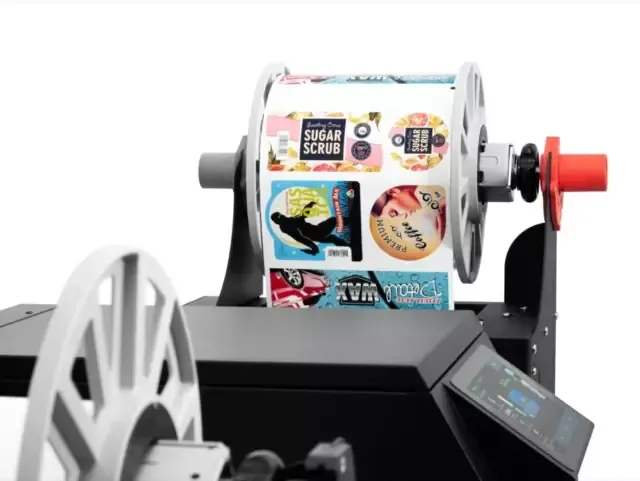
Our range counts four industrial label printers. That is deliberately few: we would rather have four machines we know inside out than a catalogue in which you have to find your own way.
But four is still four. In this article we put them side by side on the points that matter in practice — volume, environment, material and application — so that you can establish which profile is yours.
The four in brief
NeuraLabel Callisto — the machine for hazard labelling and wide formats. The only one that is BS5609-compliant and the only one that goes up to A3 width, with pigment ink and a high pace.
Afinia Label L901 — the workhorse for production that runs on. Up to well over 100,000 labels a month, ready to integrate inline, with the lowest ink cost per label.
Afinia Label L801 — the all-rounder. The same technology as the L901, sized for a medium production, usually the best balance between purchase price and cost per label.
Afinia Label L502 — the entry-level model with an industrial build. The only one with both dye and pigment ink, so suitable for more durable work as well.
Comparing on volume
Volume is usually the second question we ask, and the first on which a machine drops out. Sized too lightly and the printer becomes the brake on your production; sized too heavily and you pay for capacity that stands idle.
| Model | Volume per month | What that amounts to |
|---|---|---|
| L502 | 2,500 – 20,000+ | roughly 125 to 1,000 labels per working day |
| L801 | 5,000 – 70,000+ | roughly 250 to 3,500 per working day |
| L901 | 10,000 – 100,000+ | continuous production, inline as well |
| Callisto | medium to very high | from a few hundred to well over 1,000 a day |
Note the overlap: between 5,000 and 20,000 labels a month both the L502 and the L801 come into consideration. There it is not the volume that decides, but what you do with those labels.
Comparing on environment
Where the label ends up decides which ink you need — and that is the criterion on which most mistakes are made.
- Indoors, dry. Warehouse, production hall, shop shelf. All four models will do. Choose on volume and budget.
- Moisture, refrigeration or freezing. Condensation and cold stores ask for more. The L901 and L801 have the WaterShield version for that, the L502 can work with pigment ink, and the Callisto prints with pigment anyway.
- Outdoors or in contact with chemicals. Here WaterShield drops out: it is moisture-resistant, but it is not pigment ink. For outdoor storage, UV and aggressive substances you end up with the Callisto — or with the L502 with pigment ink for the lighter work.
- GHS labelling of hazardous substances. Then BS5609 is the bar. For businesses that do this as a matter of course, the Callisto is the machine we install.
Comparing on material and width
On material there is hardly any difference: all four print on paper, PP and PE, as long as the label has an inkjet coating. What sits under that coating can be almost anything.
Width is another story, and perhaps the most absolute criterion in this whole article:
- L502, L801 and L901: up to 216 mm
- Callisto: up to 296 mm — A3 width
If your label is above 216 millimetres, the comparison is over before it has properly begun. There is no setting that bridges that difference.
Comparing on application
Industries in themselves say little — a food business with fifty labels a day needs something very different from a food business with five thousand. Even so, we see a recurring pattern of use per model:
| Model | Where we usually install it |
|---|---|
| Callisto | Chemicals and hazardous substances, outdoor storage, wide labels on drums and containers |
| L901 | Continuous production, roll-to-roll, inline labelling, high volumes in food and drinks |
| L801 | Product and retail labels, private label, food and snacks, nutraceuticals |
| L502 | Short runs, businesses starting to print their own labels, shipping and product labels |
Which profile is yours?
Four situations that cover most questions:
“I want to start printing myself, but I do not yet know how fast it will grow.” → The L502. Lowest entry, industrially built, and with pigment ink you keep the door open to more durable work.
“I print a few hundred to a few thousand labels every day, and they have to look good.” → The L801. Top-segment image quality, with a cost per label to match.
“My line runs all day long and labelling must not be a bottleneck.” → The L901. Large rolls, a printhead that can be serviced during production, ready to integrate inline.
“My labels have to last years, or they fall under GHS.” → The Callisto. Pigment ink, BS5609 and the width to print large hazard labels as well.
Finally
This comparison brings you to a shortlist of one or two models. The last step — which of those two — depends on details that fit into no table: what your production looks like, what you expect three years from now, and what is going wrong today.
So work through the selection guide if you want to take that step yourself: five short questions and you get a reasoned recommendation. Or simply put your situation to us — with your label, material and daily volume to hand we will tell you honestly which machine we would install, even if that is the cheapest of the four.