
Update: compare the four printers without leaving the page
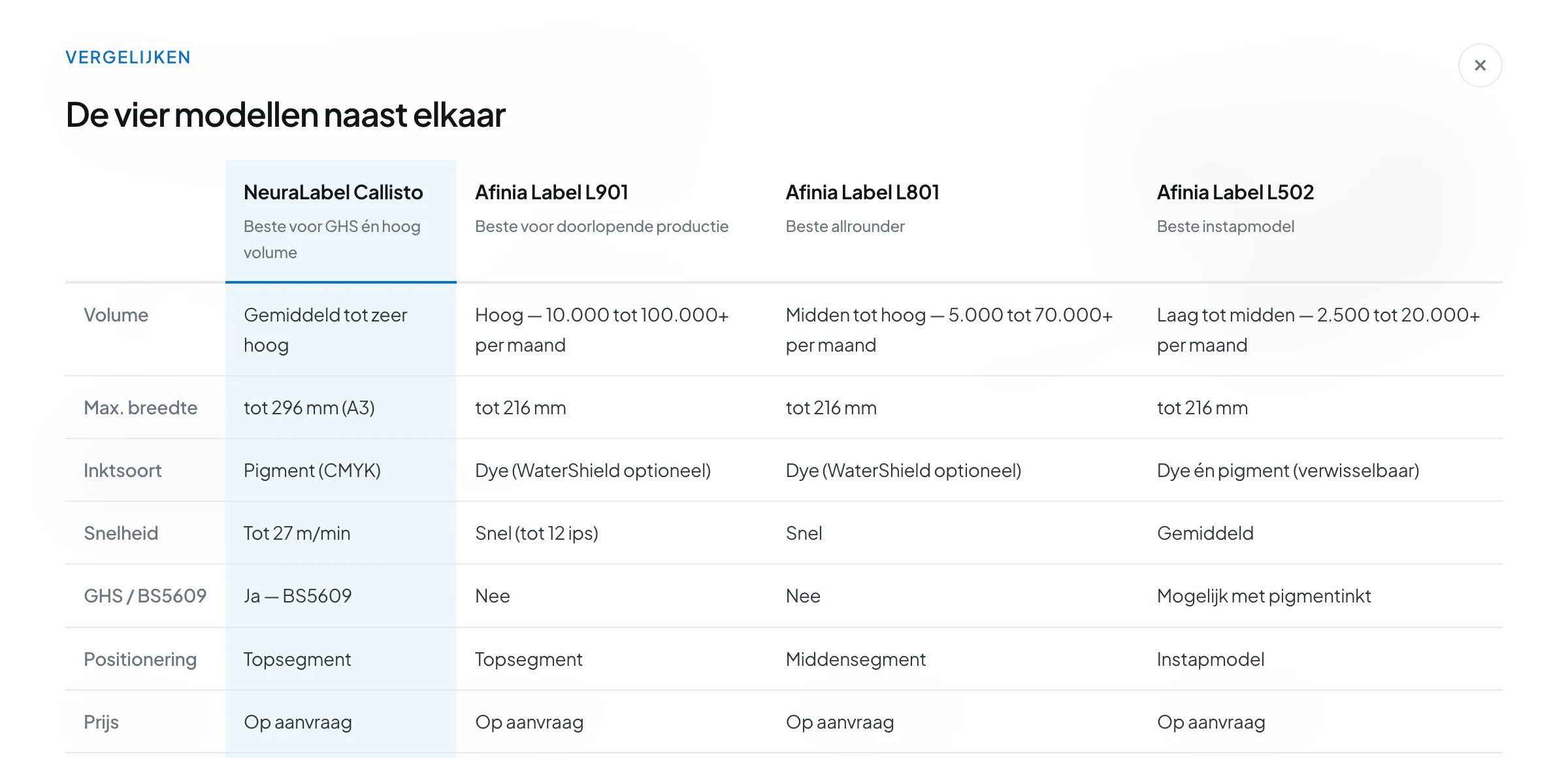
Every printer page now has a fixed bar at the bottom with an expandable comparison table. Seven criteria, four models side by side, without clicking back and forth.
Anyone choosing a printer rarely reads just one product page. You open two or three, click back and forth, and try to remember which model had that greater width again.
That back and forth is now unnecessary. On every printer page there is a fixed bar at the bottom with the four models, and one click on Comparison table puts them side by side — without leaving the page you are reading.
What the bar does
The bar scrolls with you, at the bottom of the screen. In it you see:
- The four models as buttons — Callisto, L901, L801 and L502. The model you are looking at is marked in dark. One click takes you to another model.
- The Comparison table button, which slides the overview up.
So in the middle of a specification table you can think “how was that on the L801 again?”, check it in two seconds, and simply read on where you left off.
What you can compare
The table shows seven rows — deliberately no more. It is not a second specification sheet, but exactly the information on which the choice falls in practice:
| Row | Why it is there |
|---|---|
| Volume | The number of labels a month the machine is built for |
| Max. width | The criterion that rules models out most firmly |
| Ink type | Dye, pigment, or both — decides how long your label lasts |
| Speed | Whether the machine keeps up with the pace of your production |
| GHS / BS5609 | Whether you may print hazard labels with it |
| Positioning | Entry-level, mid-range or top segment |
| Price | On request for every model, matched to your volume |
The column of the model you are viewing lights up in blue. That way you see at a glance where your machine differs from the rest — for instance that the NeuraLabel Callisto is the only one that prints up to 296 millimetres and the only one that meets BS5609, while the Afinia Label L901 handles the highest monthly volume.
At the bottom of every column there is a link to the full product page of that model, where the complete technical data are.
Why this helps with the choice
A specification on its own says little. “Up to 216 mm” only becomes meaningful when you see next to it that one machine goes up to 296 mm. “Dye ink” only carries weight when the column beside it shows “pigment” and you know that that is the difference between months and years.
In other words, comparing only works when the differences are visible at the same moment. That is what this table does — and why it is on every product page instead of on one separate comparison page.
If you would rather have an overview up front, the printer page remains the starting point: there you filter the four models by what you print, and the same comparison appears in more detail on the page itself.
Still not made a choice?
A table shows differences, but does not weigh them. If you want to know which model weighs heaviest in your situation, work through the selection guide: five short questions and you get a reasoned recommendation instead of seven rows to interpret yourself.